Review
AI reads every certificate. You approve.
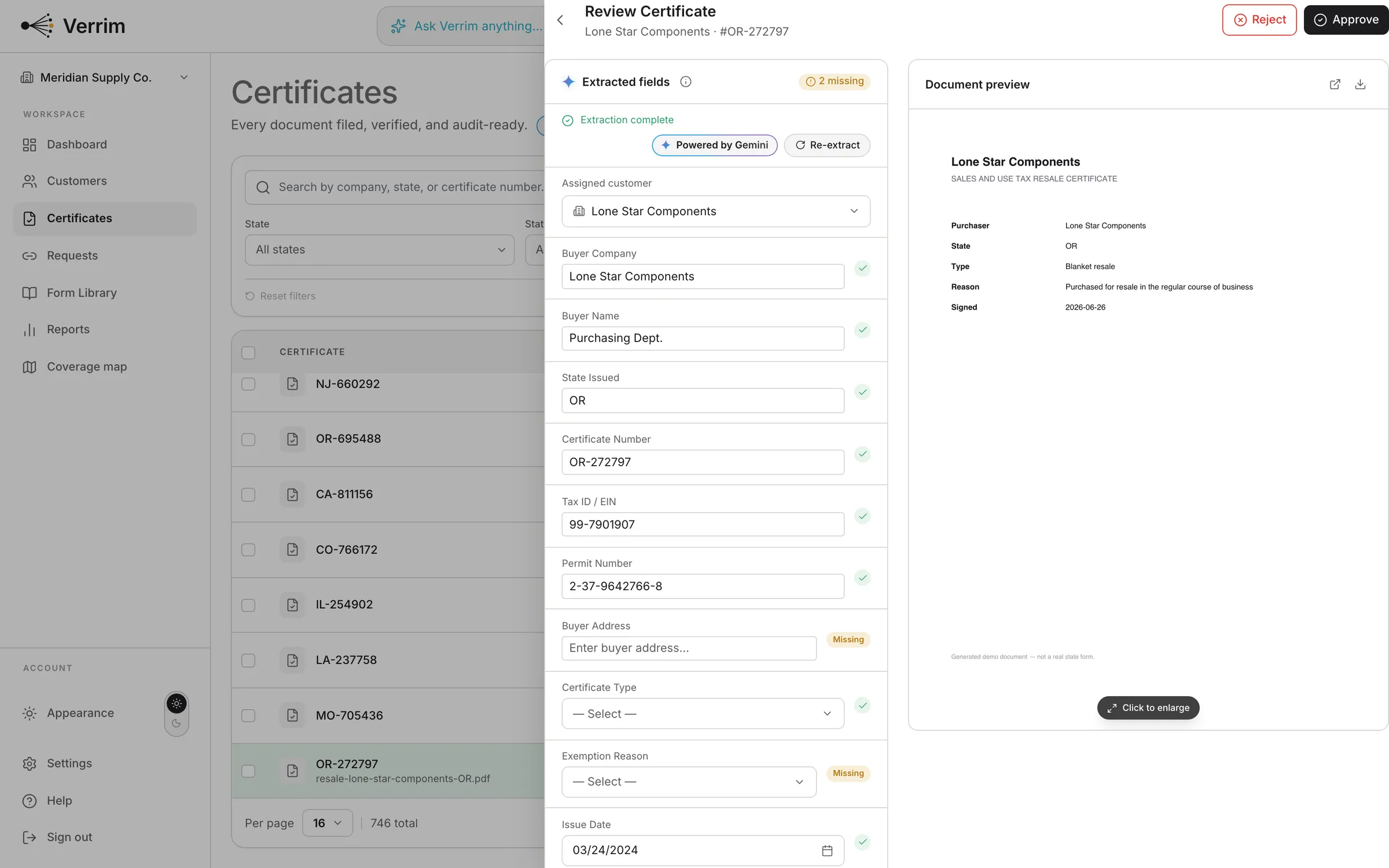
Verrim extracts the fields from every upload; you confirm in one glance before anything is filed.
verrim.com
Extraction you can trust
Every field shows exactly what the AI pulled from the document. You stay the final word.
- Permit numbers, dates, and buyer details surfaced automatically
- Every field labeled with what the AI extracted
- One-click approve or reject
- Runs on Google Gemini, and your documents are never used for training
Extracted fieldsAI + human
Permit number1-75-2846391-2
ExtractedExpirationBlanket, no expiration set by state
ExtractedApprovalWaiting on you
PendingFiled right, every time
Approve, and the certificate lands on the right customer with a full document trail.
- Create a customer directly from a certificate
- Full-screen document viewer
- Every action in the activity log
DocumentFiled
lone-star-resale-2026.pdfFiled to Lone Star Supply Co. · TX
ApprovedPreview · Download · HistoryAvailable on every certificate
ViewerAudit-ready
Extraction does the typing. You make the call.
Verrim reads the certificate and pre-fills the panel: state, exemption type, ID numbers, buyer, seller, dates. Nothing counts toward your coverage until you approve it.
- Anything extraction could not find is marked missing before you can approve
- The document sits beside the fields, so you check against the page, not your memory
- A high-confidence customer match assigns itself; a medium one is only suggested
- Your approval goes in the activity log with your name on it
Reads the resale and exemption forms of every state that issues one, plus MTC and SST.
See the full library- Does the AI approve certificates on its own?
- No. Extraction fills the fields; a person approves. Nothing counts toward your coverage until someone clicks approve, and the log records who did.
- What happens when a field is missing?
- It gets flagged as missing and you fill it in before approving. Verrim will not let a blank field through as if it had been read.
- Which AI reads the certificates?
- Google Gemini. It is named on the page and in our AI disclaimer rather than left as "our AI".
- Do my certificates train the model?
- No. Our AI providers are contractually barred from training on your uploaded certificates or the customer data inside them.
- What does the confidence level actually mean?
- It applies to the customer match, not to individual fields. High confidence assigns the certificate automatically; medium suggests a customer and waits for you.
Get started
Create an account and add your first customer.